Why Encrypt EBS Volumes?
Encryption of EBS volumes is considered a security best practice for several reasons. Encryption protects sensitive data at rest in your EBS volumes from unauthorized access if the volumes become detached from an instance. Encryption uses AES-256 cryptographic algorithm to encrypt your volumes, which meets rigorous security standards. You maintain ownership of encryption keys, rather than AWS managing the keys. Overall, encrypting EBS volumes gives you an extra layer of data protection and helps ensure compliance with regulations.
Encrypting Existing Volumes
Encrypting EBS volumes already attached to running EC2 instances is straightforward. Here are the steps:
– Create a snapshot of the volume to encrypt. This snapshot serves as the basis for the encrypted volume.
– Create a copy of the snapshot and select the option to encrypt it. The encryption process may take a while to complete.
– Create a new EBS volume from the encrypted snapshot.
– Detach the original unencrypted volume from the instance.
– Attach the new encrypted volume to the instance.
– Verify the volume is now encrypted by checking from within the instance.
Maintaining Encryption
Once a volume is encrypted, any snapshots made of it will also be encrypted automatically. Any volumes created from those snapshots will inherit encryption as well. This helps maintain encryption through the lifetime of your EBS volumes.
When launching new EC2 instances, you can also opt to have their EBS volumes encrypted by default via settings in the AMI or block device mapping.
Take Action
Encrypting EBS volumes is a simple way to add an extra layer of security. Follow the steps outlined here to start encrypting your existing volumes today.
Encryption Script Overview
The provided Python script will:
– Check the EC2 instance is running and if running, will stop the instance.
– Create a snapshot of each attached unencrypted EBS volume
– Create an encrypted copy of each snapshot
– Create encrypted volumes from the encrypted snapshots
– Detach original unencrypted volumes
– Attach new encrypted volumes
– Clean up unneeded snapshots
Running the Script
To run the script:
1. Clone or download the Python script
2. Install dependencies like Boto3
3. Update the script configuration variables
4. Execute `python -i <Intsance_ID> -key <KMS_KeyID> -r <AWS_Regon>`
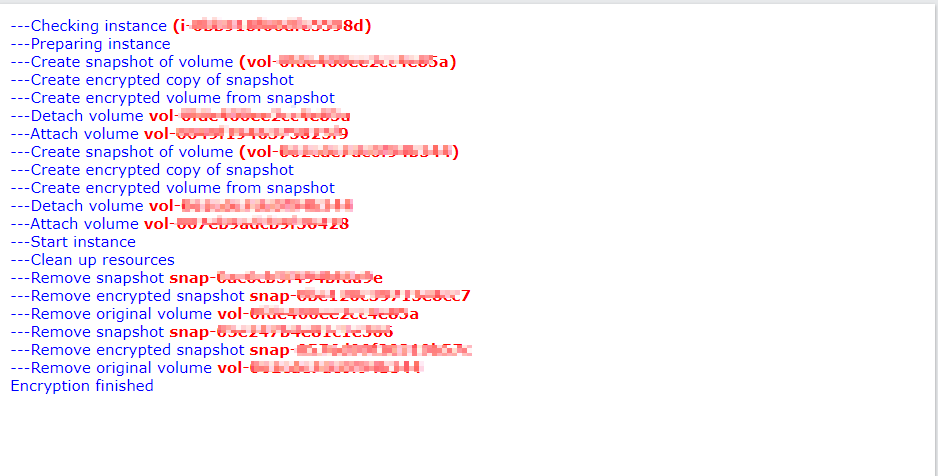
The script will output logs in HTML format showing the status of each step.
#!/usr/bin/python

"""
Overview:
    Iterate through each attached volume and encrypt it for EC2.
Params:
    ID for EC2 instance
    Customer Master Key (CMK) (optional)
    Profile to use
Conditions:
    Return if volume already encrypted
    Use named profiles from credentials file
"""

import sys
import boto3
import botocore
import argparse

""" Below piece of code is added to redirect the output to stdout as well as logfile """
class Logger(object):
    def __init__(self):
        self.terminal = sys.stdout
        self.log = open("/tmp/encryptvolume.log", "a")

    def write(self, message):
        self.terminal.write(message)
        self.log.write(message)

    def flush(self):
        #this flush method is needed for python 3 compatibility.
        #this handles the flush command by doing nothing.
        #you might want to specify some extra behavior here.
        pass

sys.stdout = Logger()
""" logger code Ends """

def main(argv):
    parser = argparse.ArgumentParser(description='Encrypts EC2 root volume.')
    parser.add_argument('-i', '--instance',
                        help='Instance to encrypt volume on.', required=True)
    parser.add_argument('-key', '--customer_master_key',
                        help='Customer master key', required=True)
    parser.add_argument('-p', '--profile',
                        help='Profile to use', required=False)
    parser.add_argument('-r', '--region',
                        help='Region of source volume', required=True)
    args = parser.parse_args()

    """ Set up AWS Session + Client + Resources + Waiters """
    if args.profile:
        # Create custom session
        print('Using profile {}'.format(args.profile))
        session = boto3.session.Session(profile_name=args.profile)
    else:
        # Use default session
        session = boto3.session.Session()

    # Get CMK
    customer_master_key = args.customer_master_key

    client = session.client('ec2')
    ec2 = session.resource('ec2')

    waiter_instance_exists = client.get_waiter('instance_exists')
    waiter_instance_stopped = client.get_waiter('instance_stopped')
    waiter_instance_running = client.get_waiter('instance_running')
    waiter_snapshot_complete = client.get_waiter('snapshot_completed')
    waiter_volume_available = client.get_waiter('volume_available')

    """ Check instance exists """
    instance_id = args.instance
    #print('---Checking instance ({})'.format(instance_id))
    print('<font size=1 face=verdana color=blue>---Checking instance <b><font size=1 color=red>({})</font></b></font><br>'.format(instance_id))
    instance = ec2.Instance(instance_id)

    try:
        waiter_instance_exists.wait(
            InstanceIds=[
                instance_id,
            ]
        )
    except botocore.exceptions.WaiterError as e:
        sys.exit('ERROR: {}'.format(e))

    all_mappings = []

    block_device_mappings = instance.block_device_mappings

    for device_mapping in block_device_mappings:
        original_mappings = {
            'DeleteOnTermination': device_mapping['Ebs']['DeleteOnTermination'],
            'VolumeId': device_mapping['Ebs']['VolumeId'],
            'DeviceName': device_mapping['DeviceName'],
        }
        all_mappings.append(original_mappings)

    volume_data = []

    #print('---Preparing instance')
    print('<font size=1 face=verdana color=blue>---Preparing instance</font><br>')
    """ Get volume and exit if already encrypted """
    #volumes = [v for v in instance.volumes.all()]
    # Below code is commented to take care of Citrix Server Encryption Issue - 7th Sep 2020
    # Once the issue is resolved, will have to revert the code
    # this is to encrypt the already encrypted volume using Citirx Account local KMS key and not
    # KMS Account Key
    volumes =  [v for v in instance.volumes.filter(Filters=[{'Name': 'encrypted', 'Values': ['false']}])]
    for volume in volumes:
        volume_encrypted = volume.encrypted
        #print(volume.volume_id)

        current_volume_data = {}
        for mapping in all_mappings:
            if mapping['VolumeId'] == volume.volume_id:
                current_volume_data = {
                    'volume': volume,
                    'DeleteOnTermination': mapping['DeleteOnTermination'],
                    'DeviceName': mapping['DeviceName'],
                }

        if volume_encrypted:
            sys.exit(
                '**Volume ({}) is already encrypted'
                .format(volume.id))

        """ Step 1: Prepare instance """

        # Exit if instance is pending, shutting-down, or terminated
        instance_exit_states = [0, 32, 48]
        if instance.state['Code'] in instance_exit_states:
            sys.exit(
                'ERROR: Instance is {} please make sure this instance is active.'
                .format(instance.state['Name'])
            )

        # Validate successful shutdown if it is running or stopping
        if instance.state['Code'] is 16:
            instance.stop()

        # Set the max_attempts for this waiter (default 40)
        waiter_instance_stopped.config.max_attempts = 80

        try:
            waiter_instance_stopped.wait(
                InstanceIds=[
                    instance_id,
                ]
            )
        except botocore.exceptions.WaiterError as e:
            sys.exit('ERROR: {}'.format(e))

        """ Step 2: Take snapshot of volume """
        #print('---Create snapshot of volume ({})'.format(volume.id))
        print('<font size=1 face=verdana color=blue>---Create snapshot of volume <b><font size=1 color=red>({})</font></b></font><br>'.format(volume.id))
        snapshot = ec2.create_snapshot(
            VolumeId=volume.id,
            Description='Snapshot of volume ({})'.format(volume.id),
        )

        waiter_snapshot_complete.config.max_attempts = 240

        try:
            waiter_snapshot_complete.wait(
                SnapshotIds=[
                    snapshot.id,
                ]
            )
        except botocore.exceptions.WaiterError as e:
            snapshot.delete()
            sys.exit('ERROR: {}'.format(e))

        """ Step 3: Create encrypted volume """
        #print('---Create encrypted copy of snapshot')
        print('<font size=1 face=verdana color=blue>---Create encrypted copy of snapshot</font><br>')
        if customer_master_key:
            # Use custom key
            snapshot_encrypted_dict = snapshot.copy(
                SourceRegion=args.region,
                Description='Encrypted copy of snapshot #{}'
                            .format(snapshot.id),
                KmsKeyId=customer_master_key,
                Encrypted=True,
            )
        else:
            # Use default key
            snapshot_encrypted_dict = snapshot.copy(
                SourceRegion=args.region,
                Description='Encrypted copy of snapshot ({})'
                            .format(snapshot.id),
                Encrypted=True,
            )

        snapshot_encrypted = ec2.Snapshot(snapshot_encrypted_dict['SnapshotId'])

        try:
            waiter_snapshot_complete.wait(
                SnapshotIds=[
                    snapshot_encrypted.id,
                ],
            )
        except botocore.exceptions.WaiterError as e:
            snapshot.delete()
            snapshot_encrypted.delete()
            sys.exit('ERROR: {}'.format(e))

        #print('---Create encrypted volume from snapshot')
        print('<font size=1 face=verdana color=blue>---Create encrypted volume from snapshot</font><br>')

        if volume.volume_type == 'io1':
            volume_encrypted = ec2.create_volume(
                SnapshotId=snapshot_encrypted.id,
                VolumeType=volume.volume_type,
                Iops=volume.iops,
                AvailabilityZone=instance.placement['AvailabilityZone']
            )
        else:
            volume_encrypted = ec2.create_volume(
                SnapshotId=snapshot_encrypted.id,
                VolumeType=volume.volume_type,
                AvailabilityZone=instance.placement['AvailabilityZone']
            )

        # Add original tags to new volume
        if volume.tags:
            volume_encrypted.create_tags(Tags=volume.tags)

        """ Step 4: Detach current volume """
        #print('---Detach volume {}'.format(volume.id))
        print('<font size=1 face=verdana color=blue>---Detach volume <b><font size=1 color=red> {}</font></b></font><br>'.format(volume.id))
        instance.detach_volume(
            VolumeId=volume.id,
            Device=current_volume_data['DeviceName']
        )

        """ Step 5: Attach new encrypted volume """
        #print('---Attach volume {}'.format(volume_encrypted.id))
        print('<font size=1 face=verdana color=blue>---Attach volume <b><font size=1 color=red> {}</font></b></font><br>'.format(volume_encrypted.id))
        try:
            waiter_volume_available.wait(
                VolumeIds=[
                    volume_encrypted.id,
                ],
            )
        except botocore.exceptions.WaiterError as e:
            snapshot.delete()
            snapshot_encrypted.delete()
            volume_encrypted.delete()
            sys.exit('ERROR: {}'.format(e))

        instance.attach_volume(
            VolumeId=volume_encrypted.id,
            Device=current_volume_data['DeviceName']
        )

        current_volume_data['snapshot'] = snapshot
        current_volume_data['snapshot_encrypted'] = snapshot_encrypted
        volume_data.append(current_volume_data)

    for bdm in volume_data:
        # Modify instance attributes
        instance.modify_attribute(
            BlockDeviceMappings=[
                {
                    'DeviceName': bdm['DeviceName'],
                    'Ebs': {
                        'DeleteOnTermination':
                        bdm['DeleteOnTermination'],
                    },
                },
            ],
        )
    """ Step 6: Start instance """
    #print('---Start instance')
    print('<font size=1 face=verdana color=blue>---Start instance</font><br>')
    instance.start()
    try:
        waiter_instance_running.wait(
            InstanceIds=[
                instance_id,
            ]
        )
    except botocore.exceptions.WaiterError as e:
        sys.exit('ERROR: {}'.format(e))

    """ Step 7: Clean up """
    #print('---Clean up resources')
    print('<font size=1 face=verdana color=blue>---Clean up resources</font><br>')
    for cleanup in volume_data:
        #print('---Remove snapshot {}'.format(cleanup['snapshot'].id))
        print('<font size=1 face=verdana color=blue>---Remove snapshot <b><font size=1 color=red> {}</font></b></font><br>'.format(cleanup['snapshot'].id))
        cleanup['snapshot'].delete()
        #print('---Remove encrypted snapshot {}'.format(cleanup['snapshot_encrypted'].id))
        print('<font size=1 face=verdana color=blue>---Remove encrypted snapshot <b><font size=1 color=red> {}</font></b></font><br>'.format(cleanup['snapshot_encrypted'].id))
        cleanup['snapshot_encrypted'].delete()
        #print('---Remove original volume {}'.format(cleanup['volume'].id))
        print('<font size=1 face=verdana color=blue>---Remove original volume <b><font size=1 color=red> {}</font></b></font><br>'.format(cleanup['volume'].id))
        cleanup['volume'].delete()

    #print('Encryption finished')
    print('<font size=1 face=verdana color=blue>Encryption finished</font><br>')

if __name__ == "__main__":
    main(sys.argv[1:])
Output of the Script
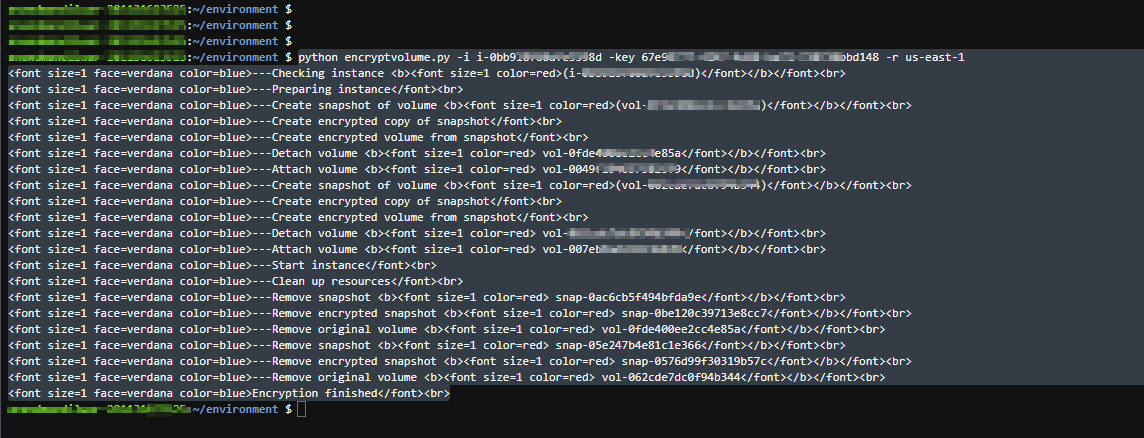
Output in HTML format
Takeaway
Encrypting EBS volumes is easy with this Python script leveraging AWS APIs. Follow the steps above to improve security and meet compliance requirements. Let me know if you have any other questions!
Hope this helps. Happy reading !!!
~Anand M


Leave a Reply